AI-Assisted Customer Service Automation for High-Volume E-Commerce
A multi-session automation platform that combines browser automation, AI-assisted responses, structured logging, and a training-data feedback loop to handle customer service chats — missing tracking, refunds, replacements, exchanges, price matches, and manual review — at scale.
Scale: Thousands of support interactions across multiple concurrent sessions per machine
Human oversight: Manual mode, AI suggestion approval, transcript review, in-app history viewer
The Problem
High-volume e-commerce operations generate a constant stream of repetitive support conversations: missing tracking numbers, refund requests, replacements, exchanges, price matches, and general order questions. Done by hand, each one takes a person several minutes, the phrasing varies between operators, outcomes are inconsistent, and there is rarely a clean audit trail of what was said or what was decided.
As order volume grows, the support workload grows with it — and the cost of inconsistency, missed cases, and lost data compounds. The team needed a system that could conduct or assist these conversations across many sessions at once, log every interaction, and steadily improve over time.
The Solution
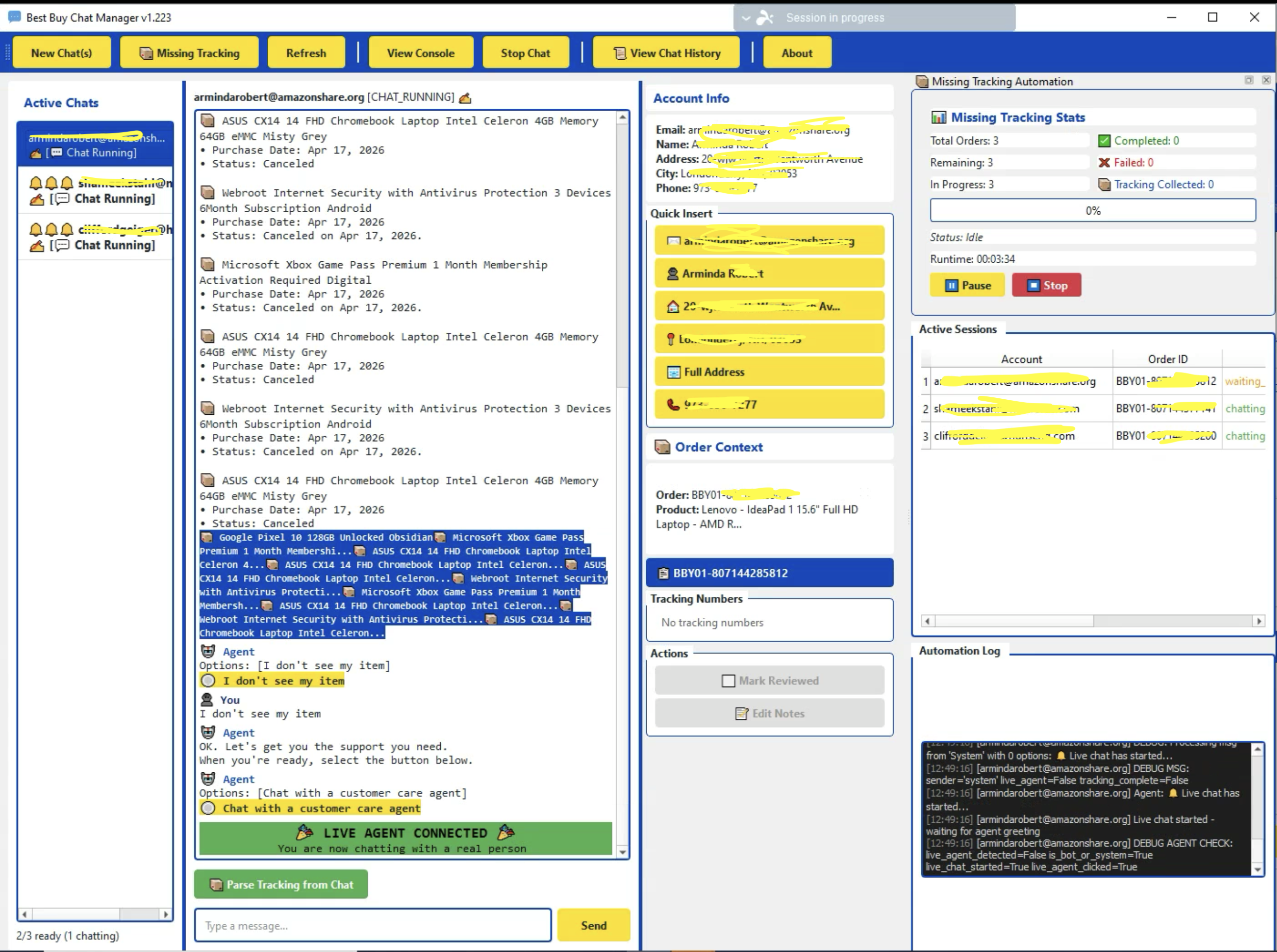
ThinkGenius designed and built a production-grade automation platform — not a chatbot. The system drives real customer service chat sessions inside isolated browser profiles, conducts conversations through pattern-matched logic and AI-generated suggestions, extracts structured outcomes (tracking numbers, case IDs, approvals), and writes everything to a centralized database. Operators run the platform from a purpose-built desktop application that supports both fully automated and human-in-the-loop modes.
// The platform in operation — driving a live support chat session inside an isolated browser profile.
Supported Chat Workflows
Automated
Missing Tracking
Identifies orders likely missing tracking, opens a chat, requests the missing numbers, handles verification, and writes validated tracking data back to the database — typically end-to-end with no human involvement.
Workflow
Refund Requests
Drives the conversation toward initiating a refund for missing, damaged, or undelivered items, tracking each stage from issue description through case ID collection.
Workflow
Replacement Requests
Routes the conversation toward a replacement order rather than a refund, including the address confirmation and quantity steps that the replacement flow requires.
Workflow
Exchange Requests
Handles product exchange flows, including the additional verification and representative navigation that distinguish exchanges from refunds and replacements.
Semi-Automated
Price Match Requests
Opens the chat, waits for a live agent, and sends a dynamically populated opening message with the order context. The operator then takes over with full conversation logging in place.
Human-in-the-Loop
Manual Chat / Training Mode
Lets a human operator conduct the chat directly through the application while the system logs every message, sender, timestamp, and outcome — feeding a structured training dataset that improves future automation.
Architecture Overview
The platform is structured as a multi-process desktop application with isolated worker processes per chat session, all coordinating through a centralized database. Each layer has a single responsibility, and failures in one session never affect another.
PySide6 desktop UI: Operator-facing app that displays active sessions, live transcripts, AI suggestions, history, and automation controls.
Worker processes: One worker per chat session, each owning a single browser profile. Workers communicate with the UI over local WebSockets using a structured JSON event protocol.
Playwright browser automation: Drives the live chat interface using stable DOM identifiers rather than brittle hash-suffixed CSS classes.
Kameleo browser profiles: Per-account anti-detection profiles with realistic fingerprints, persistent sessions, and per-account proxy assignment.
OpenAI-powered suggestion engine: Stage-aware response suggestions and structured tracking-number extraction, with feedback logged for continuous improvement.
Centralized MySQL database (AWS): Single source of truth for sessions, messages, suggestions, feedback, queues, tracking numbers, debug logs, and crash reports.
Logging & analytics tools: In-app history viewer plus dedicated analysis scripts for success rates, AI performance by stage, and failure root causes.
Every subsystem reads and writes through one canonical schema, so any session can be replayed, audited, and analyzed from any machine with database access — no log files to collect, no local state to chase down.
AI-Assisted Conversations
The AI integration is grounded and specific. It is not a general chatbot — it has one job: given the current state of a support conversation, suggest the most appropriate next response, with a confidence score and reasoning.
Stage detection: Each new message is classified into one of seventeen defined conversation stages (greeting, verification, resolution selection, awaiting case ID, completed, and others).
Context-aware suggestions: Prompts include the conversation history, current stage, and account context (name, email, phone, address, order, product, quantities, known tracking).
Approve, modify, or reject: Suggestions appear in the AI Assistant panel where operators can send as-is, edit, or reject — every action is logged.
Structured extraction: A lighter model (GPT-4o-mini) parses tracking numbers out of free-form agent responses and returns structured JSON validated against expected counts.
Feedback loop: Thumbs up/down ratings store the full conversation context with the rating, feeding analysis tools that surface where the AI under-performs by stage.
Manual Mode and Training Data
Manual mode is not a fallback — it is a deliberate feedback mechanism. When an operator conducts a chat through the app, every message from both sides is captured along with timestamps, the chat mode, the account, the order, and the final outcome.
Over time this accumulates into a structured dataset showing how experienced operators actually handle each workflow:
Which opening messages consistently lead to agent engagement
What verification information representatives typically ask for
How to respond to uncommon or edge-case questions
Which phrasing is most effective for each resolution type
Which conversation patterns indicate success, partial resolution, or failure
Which patterns are stable enough to automate in the next iteration
This data feeds directly back into AI prompt refinement, stage-detection improvements, and the pattern library used by the automation. Each manual conversation makes the next automated conversation a little better.
Missing Tracking Intelligence
The missing tracking workflow is one specific automation within the broader platform — and a good illustration of how analytical and conversational logic combine in a single pipeline.
Identify candidates. A periodic analysis job compares ordered quantity, shipped quantity, known tracking numbers, full and partial cancellations, and carrier-reported package weights to flag orders that are likely missing tracking.
Queue the work. Flagged orders are written to a dedicated table that the chat manager treats as the work queue.
Open the chat. A worker launches the account's Kameleo profile in Playwright, navigates to a delivered order, and connects through the chat widget to a live agent.
Request and verify. The system sends a structured tracking request, handles verification questions (phone, email, address, name), and manages small talk and hold requests without losing the thread.
Extract and validate. Tracking numbers are extracted using a layered approach — carrier-specific regex, database lookup against known carrier tables, and AI-assisted parsing for unusual formats — then validated against the expected missing count.
Decide completeness. The session ends when the expected count is met, the agent indicates no more are available, or a configured limit is reached. Results are written back to the database with the full transcript and outcome code.
Database, Logging & Auditability
A centralized MySQL database on AWS is the backbone of the system. Every session, message, suggestion, decision, and failure is captured in a structured schema so operators and developers always have the full picture.
Sessions
Chat Sessions & Messages
One record per session with mode, account, order, message counts by sender, and a precise outcome code. Every individual message is logged separately with sender role, timestamp, and any clickable options.
AI
Suggestions & Feedback
Every AI suggestion is stored with its stage, confidence, and the operator's action. Explicit thumbs up/down ratings store the full conversation context for downstream quality analysis.
Tracking
Tracking Numbers
Collected tracking numbers are deduped per order and linked to the chat session that produced them, providing full provenance from order to conversation to recovered shipment.
Queue
Queue Records
Work queues are first-class tables with status tracking and unique constraints, preventing duplicate processing across machines while supporting incremental analysis.
Errors
Error & Send Logs
Every failed message send is recorded with error type, retry count, and a JSON snapshot of session health, supporting precise post-mortem analysis of reliability issues.
Crashes
Remote Crash Reports
Unhandled exceptions are captured with full stack trace, OS, Python version, and active session context — written to the database before exit so triage never depends on log file collection.
Debug
Debug Snapshots
Verbose sessions capture HTML snapshots, network activity, and state transitions directly to the database, making any session fully introspectable from any developer machine.
Outcomes
Structured Outcomes
Every session ends with a precise outcome string (tracking_collected:3, refund_approved, failed: no live agent) — the foundation for every analytics and improvement workflow.
Analysis
Analysis Run History
Each analysis run records its inputs, outputs, and the highest processed session ID, enabling true incremental analysis and a historical record of automation performance.
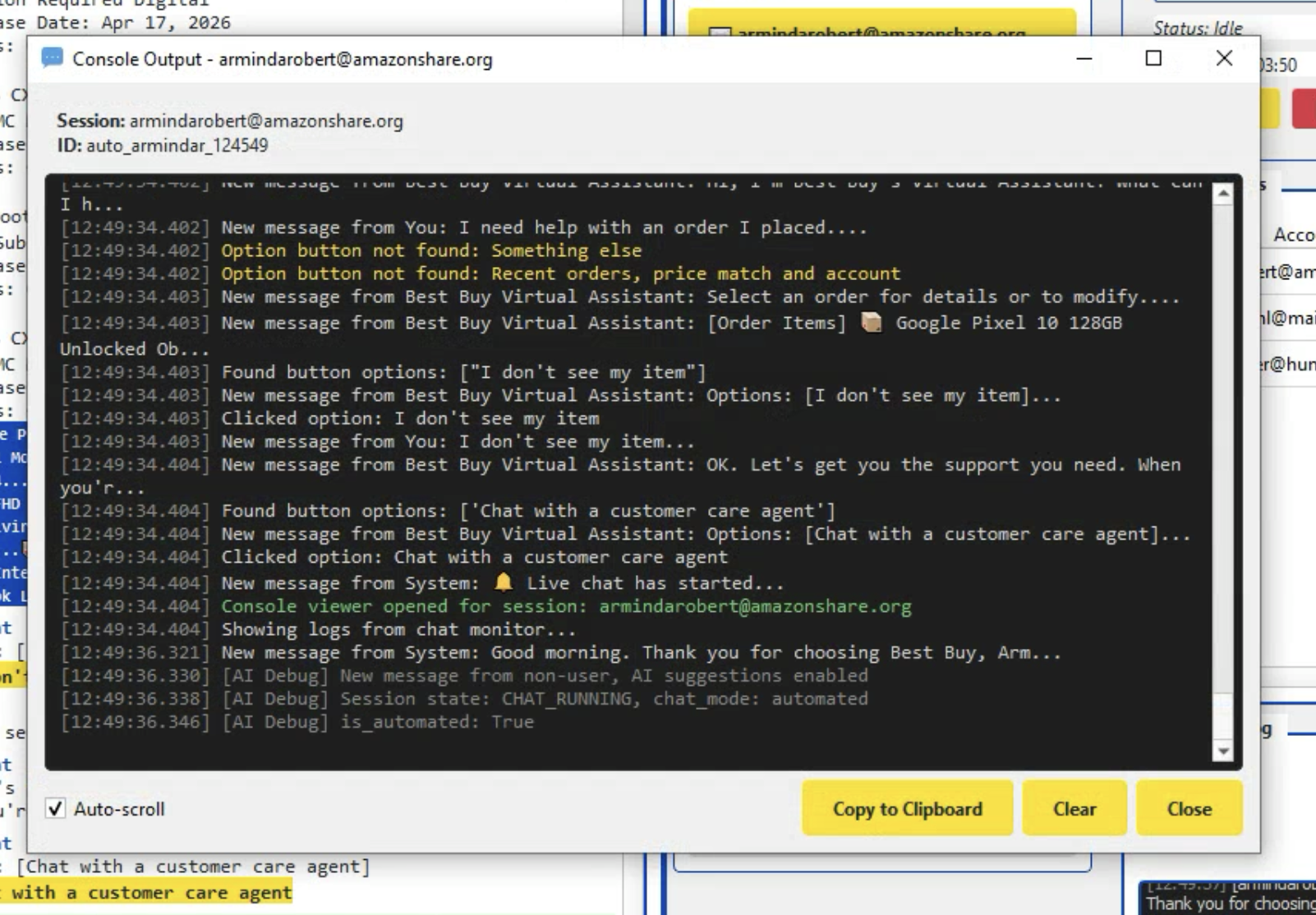
// In-app console logger — full session output streamed to the centralized database for remote debugging.
Scalability & Multithreading
The platform is built to run many chat sessions concurrently and to scale horizontally across machines without coordination overhead.
Worker isolation: Each session runs in its own process with its own browser profile and async event loop, so a crash in one session never affects another.
Concurrent sessions: A configurable manager runs eight or more simultaneous browser sessions per machine, drawing from a shared queue.
Queue-based processing: Orders are pulled from MySQL with status tracking, so adding another machine simply adds capacity to the same pool.
Duplicate prevention: Database-level unique constraints and session locking guarantee that the same work item is never processed twice.
Retry & failure handling: Configurable retries for transient failures; account-level skip flags for accounts that repeatedly fail, so the queue keeps moving.
Centralized state: The UI, workers, analysis tools, and any other machine all read and write through the same schema — no local state to keep in sync.
Technical Challenges
DOM
Dynamic Chat Interface Automation
Modern chat widgets ship hash-suffixed CSS classes that change on every deploy. The system targets stable DOM identifiers, data-cy attributes, and structural selectors that survive widget updates.
Detection
Bot vs. Human Agent Detection
The same chat widget routes both bot and human messages, often styled identically. Pattern matching on sender names, message structure, and explicit system events ("Live chat has started") cleanly separates the two phases.
NLP
Conversation Variability
Real agents don't follow scripts. An extensive pattern library handles verification, small talk, hold requests, inactivity prompts, and quantity questions, with AI-generated responses for anything outside the library.
Anti-Detection
Browser Profile Management
Per-account Kameleo profiles provide realistic fingerprints, persistent sessions, and per-account proxy routing. Failed headless logins automatically relaunch in headed mode and return to headless on success.
Extraction
Structured Data from Natural Language
Agent responses contain tracking numbers in any format — paragraphs, lists, tables. A layered approach (regex, carrier database lookup, AI parsing) reliably produces a structured list with quantities.
Concurrency
Concurrent Session Coordination
Eight workers against a shared queue requires careful coordination. Database-level constraints, in-progress tracking, and per-worker identity prevent duplication and keep the pool fully utilized.
Observability
Remote Debugging & Crash Reporting
All debug data and crash reports flow to the database, so a developer can introspect any session — DOM, network, state, exceptions — from any machine without shipping log files.
Completeness
Knowing When a Workflow Is Done
Tracking-collection completeness is non-trivial: agents may answer in multiple messages, provide fewer than expected, or include extras. A settling delay plus AI-assisted verification determines the true end state.
Results & Business Value
Reduced manual workload: Operators who previously juggled three or four chat windows now oversee eight or more concurrent automated sessions, intervening only on edge cases.
Higher throughput: Queue-based processing turns support capacity into a function of machine count rather than headcount.
Consistent conversations: Every session follows the same logic, uses the same phrasing, and produces the same structured outcome data.
Audit trail by default: Every message, decision, and outcome is permanently logged with full context.
Visibility into failures: Structured failure codes and built-in analysis tools surface root causes — including operational insights like time-of-day performance variance — directly from production data.
Reusable training data: Manual conversations accumulate into a domain-specific dataset that drives ongoing AI and pattern-library improvements.
Scalable support operations: Adding capacity is adding a machine — no rework, no queue migration, no operator retraining.
Foundation for further automation: The same architecture cleanly extends to additional workflows as new patterns are identified in the data.
This is not a brittle script that breaks on the first unexpected agent response — it is an engineered system with well-defined states, structured logging, AI assistance, training pipelines, and continuous-improvement tooling.
Feature Summary
Automation
Automation Capabilities
Multi-session chat automation (8+ concurrent sessions per machine)
Fully automated missing tracking workflow
Refund, replacement, exchange, and price-match modes
Database-backed queue processing with duplicate prevention
AI
AI Capabilities
Stage-aware response suggestions with confidence scores
17-stage conversation classification
Structured tracking-number extraction from natural language
Suggestion approval / rejection feedback logging
Operations
Operator Tooling
Manual chat mode with full transcript capture
In-app chat history viewer with search
Remote crash reporting
Debug logging (HTML, network, state)
Built-in analysis scripts for success and AI quality
Infrastructure
Infrastructure
Playwright browser automation
Kameleo anti-detection browser profiles
MySQL on AWS as centralized data store
WebSocket IPC between UI and worker processes
AWS-hosted storage and database hosting
Technology Stack
Python (asyncio)
PySide6 desktop UI
Playwright
Kameleo
OpenAI GPT-4o
OpenAI GPT-4o-mini
MySQL
WebSocket IPC
AWS (EC2 / RDS)
Per-account proxies
Centralized logging
Remote crash reporting
Why This Pattern Generalizes
The architecture — isolated workers driving real interfaces, AI used surgically with full feedback capture, a single canonical database, and a desktop app built around how operators actually work — applies anywhere repetitive human workflows happen inside web interfaces. Customer service is one expression of it; claims processing, account remediation, and marketplace operations are others.
// Let's Build
Need a Custom Automation System Built Around Your Workflow?
ThinkGenius builds practical automation platforms that combine browser automation, AI, database engineering, and operational tooling to solve real business problems.